Developer guides
How to send WhatsApp messages from your app with the inaiy API
Send WhatsApp template messages from your own system, get delivery updates with signed webhooks, and reply inside the 24-hour window — step by step, with code in cURL, Node.js, Python and PHP.
inaiy team · · 7 min read
On this page
Order confirmations, delivery updates, appointment reminders, OTPs — the messages customers actually wait for usually come from your systems, not from someone typing in an inbox. This guide shows how to send them on WhatsApp from your own app with the inaiy API, track whether they were delivered, and pick up the conversation when the customer replies.
By the end you will have sent a template message with one HTTP request, set up a webhook for delivery updates, and know which errors to expect. Every step works with cURL, so you can follow along without writing an app.
What you need
- An inaiy workspace on the Growth or Business plan (the API and webhooks are included there).
- A WhatsApp Business number connected under Settings → Channels.
- An approved message template. Every number gets
hello_world, which is enough to start.
Step 1: Create an API key
In your workspace open Settings → Developer → API keys and click Generate key. Give it a name that says which system uses it — “Order system”, “CRM sync” — so you know what breaks if you ever disable it.
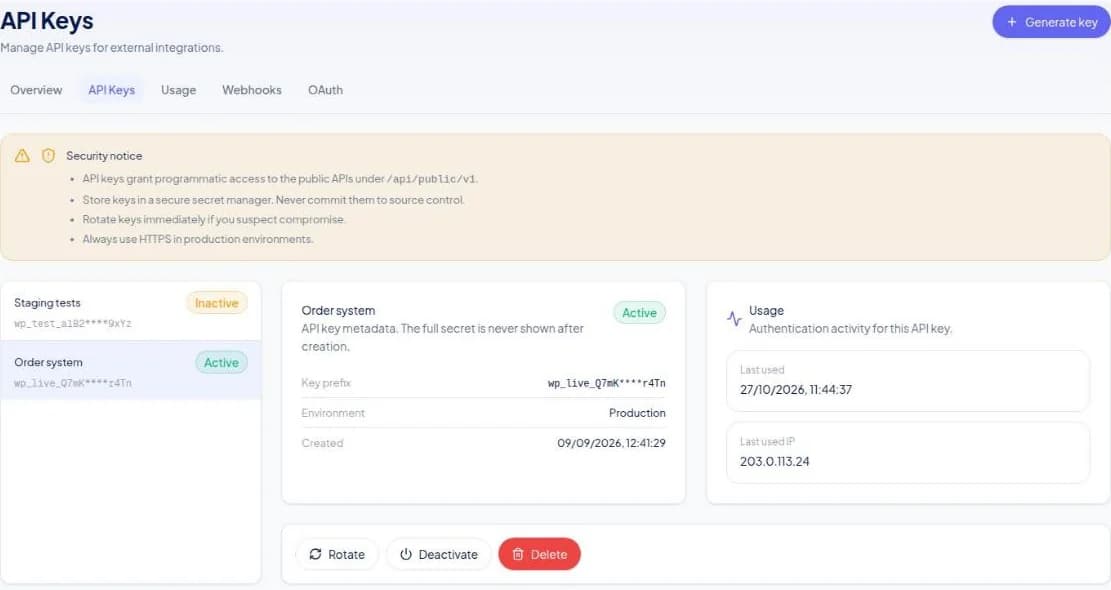
Copy the key into an environment variable on your server. It has full access to the workspace, so it never belongs in a browser, a mobile app or a Git repository.
Every request also sends x-tenant-id, your workspace subdomain (acme for acme.inaiy.com), so inaiy knows which workspace you mean. The same page shows it under Connection details with a copy button.
Step 2: Find your channel ID
A workspace can have several numbers (and Instagram or Messenger channels), so each message says which one to send from. On the same Settings → Developer page, the Channels list shows every connected number, Instagram account and Messenger Page with its ID. Copy the WhatsApp number's ID and keep it next to your key:
INAIY_API_KEY=wp_live_xxxxxxxxxxxxxxxxxxxx
INAIY_CHANNEL_ID=662fa1b2c3d4e5f6a7b8c9d0
Step 3: Send a template message
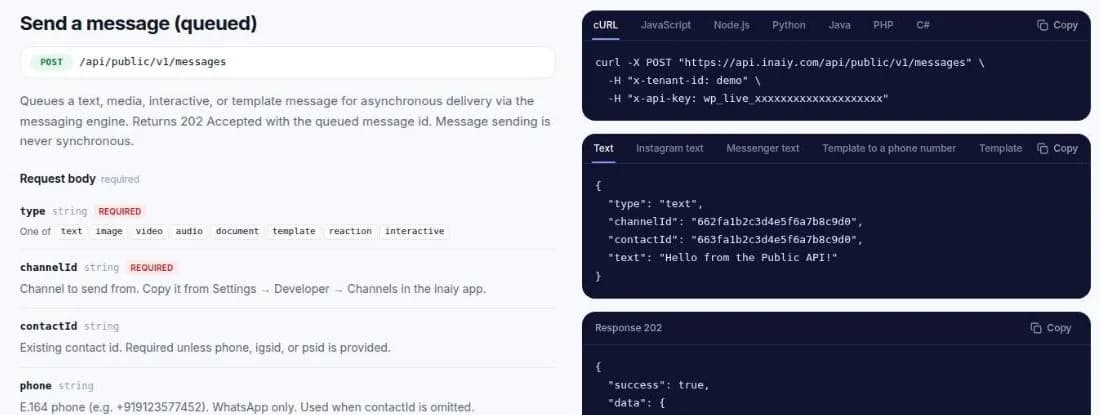
WhatsApp only lets businesses start a conversation with an approved template. Send one to a phone number and let inaiy create the contact if it is new:
curl -X POST "https://api.inaiy.com/api/public/v1/messages" \
  -H "x-tenant-id: your-workspace" \
  -H "x-api-key: $INAIY_API_KEY" \
  -H "Content-Type: application/json" \
  -d '{"type":"template","channelId":"662fa1b2c3d4e5f6a7b8c9d0","phone":"+919876543210","createContactIfMissing":true,"contactName":"Priya","template":{"name":"hello_world","language":"en_US"}}'
The API replies 202 Accepted with a message id and "status": "queued". Sending is asynchronous on purpose: your request returns in milliseconds even when Meta is slow, and inaiy retries delivery for you. The message also appears in the shared inbox, so your team sees exactly what the customer received.
Templates with variables
template.parameters.body, in order: ["Priya", "#1042"].Step 4: Get delivery updates with webhooks
Instead of polling, let inaiy tell you when something changes. In Settings → Developer → Webhooks, create an endpoint and choose the events you care about:
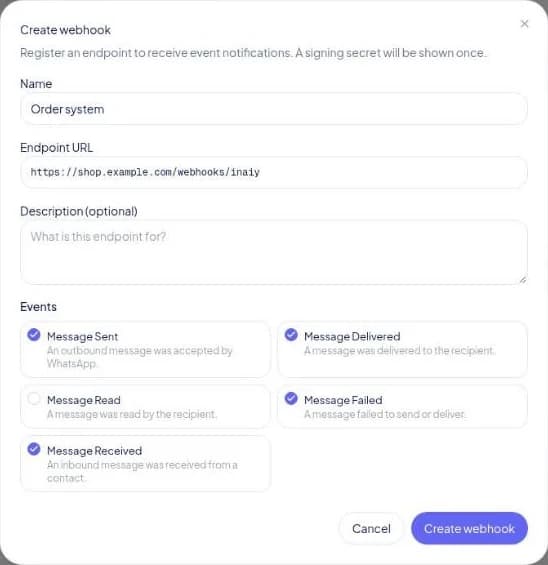
message.sent,message.delivered,message.read— progress of your outbound messagemessage.failed— the number is not on WhatsApp, the template was paused, and similar problemsmessage.received— the customer wrote back
Each delivery is signed with HMAC-SHA256 in the X-Inaiy-Signature header. Verify it before you trust the payload, and skip events whose eventId you have already processed — retries can deliver the same event twice. The webhooks guide has copy-paste verification code for Node.js, Python and PHP.
Step 5: Reply when the customer answers
When a customer replies, WhatsApp opens a 24-hour window in which you can send free-form messages: plain text, images and documents, or interactive buttons and lists. Use the contactId from the message.received event:
{
  "type": "interactive",
  "channelId": "662fa1b2c3d4e5f6a7b8c9d0",
  "contactId": "663fa1b2c3d4e5f6a7b8c9d0",
  "interactive": {
    "type": "button",
    "body": {
      "text": "Confirm your order #1042?"
    },
    "action": {
      "buttons": [
        {
          "type": "reply",
          "reply": {
            "id": "confirm_order",
            "title": "Confirm"
          }
        },
        {
          "type": "reply",
          "reply": {
            "id": "cancel_order",
            "title": "Cancel"
          }
        }
      ]
    }
  }
}
Or hand the conversation to a person: it is already in the inaiy inbox with the full history, so an agent can pick it up without asking the customer to repeat themselves.
Errors you will meet first
| Status | Usually means | Fix |
|---|---|---|
400 | ACCOUNT_CONFIGURATION_ERROR — tenant headers missing | Send x-tenant-id with your workspace subdomain |
401 | Missing, mistyped or disabled API key | Check the key and that it is active |
403 | API not on your plan, or the key belongs to another workspace | Use Growth or Business; check x-tenant-id |
422 | Template not approved, wrong variables, or free-form text outside 24 hours | Use an approved template with every variable filled |
429 | Rate limit reached | Wait for retry-after; use broadcasts for bulk sends |
The full list, with the error envelope and what to retry, is on the errors page.
Where to go next
- Broadcasts API — send one template to thousands of contacts, scheduled and paced for you.
- Contacts API — keep inaiy in sync with your CRM with
upsert. - Catalog API — push products so customers can browse and order inside WhatsApp.
- OAuth 2.0 — building an app for other businesses? Let them install it with scoped access.
Frequently asked questions
Which inaiy plans include the WhatsApp API?
The REST API and webhooks are included on the Growth and Business plans. Business also includes the developer platform features such as OAuth apps.
Can I send a free-form WhatsApp message to a new customer?
No. WhatsApp requires an approved template to start a conversation. After the customer replies you can send free-form text, media and interactive messages for 24 hours.
How do I know a WhatsApp message was delivered?
Subscribe a webhook to message.delivered and message.read, or fetch the message by id. Failed sends arrive as message.failed with the reason.
Is there an OpenAPI spec for the inaiy API?
Yes. Download the OpenAPI 3.1 document from inaiy.com/developers/openapi.json and import it into Postman, Insomnia or a code generator.
Try it on your own number
Shared inbox, automation, campaigns and the API — free to start, no card needed.